Can my laptop stand in for Claude Haiku?
Everything my Hermes agent does still goes through Anthropic first. In that post I said I expected local models to eventually get good enough to handle my files without sending them to the cloud. This week I wanted to see how close they are today, using the Framework 12 laptop I already have. It has no graphics card, and with a local model nothing leaves the machine unless I ask it to search the web.
The short version: it works, and it's more capable than I expected. It's also slow. A question that needs a web search takes between one and a half and three minutes, so this isn't replacing Haiku for anything quick. What follows is the setup in case you want to try it out yourself.
The model and the hardware
My Framework 12 laptop has an Intel Core 5 320 with integrated graphics and 32 GB of RAM. That rules out most models that are worth talking to, unless they're a mixture of experts.
Qwen3-30B-A3B is one. It has 30 billion parameters but only uses about 3 billion for each token it writes, so it has the knowledge of a large model and the speed of a small one. At 4-bit quantization the file is 18.6 GB, which fits in RAM with room to spare.
To run it I built llama.cpp with Vulkan, so the integrated GPU does the work.
| Where it runs | Writing (tokens/s) | Reading a prompt (tokens/s) |
|---|---|---|
| CPU only | 7.1 | 74 |
| Integrated GPU | 16.8 | 106 |
Seventeen tokens a second is comfortable reading speed, though it drops to about eight once a conversation gets long. Reading is the part to watch, because every search result and web page has to be read before it can answer.
The setting that made it three times slower
The first time I asked it a question that needed a web search, the answer took almost six minutes.
The server logs showed it reading search results at 23 tokens a second instead of 100. The cause was flash attention, an option that usually speeds things up. On this integrated GPU it does the opposite once a conversation gets long: at a few thousand tokens in, it cut reading speed from 88 tokens a second to 26.
Turning it off needed one more change. Without flash attention, a 32,000-token context needs a bigger scratch buffer than the GPU could allocate, so I process prompts in smaller batches. That costs 10 to 15 percent, which is a good trade for the full context. I also capped web searches at five results instead of ten. The same question now takes 2.7 minutes, and simpler web questions finish in about a minute and a half.
Giving it the basics Haiku has
Out of the box, a local model doesn't know what day it is, can't search, can't see the computer it's running on, and forgets you between chats. Search and a view of the computer came from tools. The date and a memory came from the system prompt, which gets its own sections below.
Web search. My Hermes agent uses Exa so I did the same here. Exa has a free endpoint that needs no API key, and a search came back in a third of a second. It handles both searching and reading full pages. llama.cpp's built-in web chat can call tools through MCP, so connecting it took a config file and a small bridge program.
Its own computer. This one surprised me. I asked it to check my RAM, and it refused:
The tools only run fixed commands, so they can't change anything. If I want it to do more, I can start it with shell access, and the web chat asks me to approve every command before it runs.
Writing the system prompt
A system prompt is the set of instructions a model reads at the start of every chat. When I use Haiku, Anthropic has already written one. A model I download has nothing, so it doesn't know the date, that it has tools, or how long its answers should be.
Mine lives in a plain Markdown file with two placeholders, {{DATE}} and {{MEMORY}}. Nothing in the file is hardcoded to a day. Each time I start the model, the launcher script swaps {{DATE}} for the current date (today it became "Saturday, November 14, 2026 (time zone EST)") and {{MEMORY}} for my saved facts, then hands the result to llama.cpp as the web chat's default system prompt. Here's a trimmed version of the template:
 1You are a helpful, concise assistant running locally on the user's Linux computer.
 2
 3Current date: {{DATE}}. Your training data ends around 2024, so a lot has
 4happened since then that you don't know about.
 5
 6Style:
 7- Lead with the answer, then add brief supporting detail. Aim for under 150 words
 8  unless the user asks for depth.
 9- If you are unsure or don't know, say so. Never invent facts, numbers, quotes or URLs.
10- Don't comment on which tools you did or didn't use, unless the user asks.
11
12Web tools:
13- You MUST call the web search tool before answering any question about something
14  that may have changed since 2024: anything "latest", "current", "new" or "recent",
15  news, prices, product releases, software versions...
16- Never state a version number, release date, price or recent event from memory.
17  If you have not searched, you do not know it.
18- After using the web, cite your sources as Markdown links, using only URLs that
19  appeared in tool results.
20
21This computer:
22- Use the system tools whenever the user asks about their computer, and never
23  claim you can't access it.
24
25Memory:
26- Facts the user asked you to remember in earlier chats (they may be out of date):
27{{MEMORY}}
The first draft was much shorter. Most of the rules that read oddly specific are there because of something it got wrong in testing:
- "Never state a version number... from memory" came after it invented a llama.cpp release (more on that below).
- "Aim for under 150 words" came after answers that ran past 450 tokens. At eight tokens a second late in a conversation, that's nearly a minute of waiting.
- "Don't comment on which tools you did or didn't use" came after it finished a unit conversion with "No web search was needed."
- "Never claim you can't access it" went in with the system tools, after the RAM refusal above. The model had talked itself into believing it couldn't see the machine, so I spelled it out.
There are two limits to know about. The date is filled in when the server starts, so if I leave it running for a few days I restart it. The prompt is also only the web chat's default, so other apps that connect to the same server don't get it.
Prompt rules helped, but they weren't enough on their own, as the thinking section below shows.
A memory that fits in a text file
Every chat starts from nothing. The web chat saves my conversations in the browser, but the model only ever sees the one I'm in. Hermes has a real memory system, and I didn't want to rebuild it here, so this one is deliberately small.
Memory is a text file, ~/.config/qwen3/memory.md, with one fact per line. I can open it and edit or delete lines whenever I want. The model gets two tools, one that adds a line and one that removes one. When I start the model, the launcher reads the file into the system prompt under "Facts the user asked you to remember."
The tools are a short Python program that llama.cpp starts when the model calls one of them. Between calls it sits idle, and nothing runs in the background or saves facts on its own.
The prompt tells the model when to use them. It should save when I ask it to remember something or tell it a lasting fact or preference, like my name, job, location or preferred units. It shouldn't save one-off details or anything sensitive, like passwords or health and financial details, unless I explicitly ask. It should also never put my personal details into a web search, since Exa sees every query.
The tools add a few limits of their own:
- At most 100 facts of up to 200 characters each. Duplicates are skipped.
- If a "forget" matches more than one fact, it removes nothing and asks the model to be more specific.
- The file is readable only by me.
To test it, I made up two facts, that I'm vegetarian and prefer metric units:
| What I said | What it did |
|---|---|
| "Remember that I prefer metric units." | Saved it. |
| "I'm vegetarian, by the way, so keep that in mind for any food suggestions." | Saved it, even though I didn't say "remember." |
| "How many kilometers is 26.2 miles?" | Answered and saved nothing, which is right. |
| After a restart, in a new chat: "What do you remember about me?" | Listed both facts. |
| "Suggest a quick dinner I could make tonight." | A tofu stir-fry, without being reminded. |
| "Forget that I'm vegetarian." | Removed exactly that line. |
It's imperfect. The stir-fry weighed the tofu in grams and still measured the rice in cups. One reply ended with a stray <no_tool_call> tag, which is a Qwen3 quirk. Facts saved in one chat only reach other chats after a restart, since the prompt is built at startup. Every fact also costs a little reading time at the start of each chat. Fifty short facts add about 10 seconds to the first reply, which is why it's capped at 100.
It doesn't summarize past conversations, search my chat history or extract facts in the background. It's a notepad the model can write to, and it reads that notepad at the start of every chat.
Guardrails
Most of these came from the same principle as Hermes: it can read freely, and anything that changes something needs my OK.
- The system tools are read-only. Shell access is opt-in, and I approve each command.
- The browser never sees my real Chrome profile.
- Memory follows the rules above: nothing sensitive unless I ask, and nothing personal in web searches.
- The npm packages behind the tools are pinned to versions that have been out for at least three weeks.
The real cost is memory. While the model is loaded it holds about 17 GB as GPU memory, which doesn't show up under any process in top. That leaves the rest of the laptop with 2 to 3 GB, and my swap filled up with Firefox open. I start it when I need it and stop it when I'm done.
How fast it is
| Kind of question | Time |
|---|---|
| No tools (chat, math, memory) | 20 to 70 seconds |
| Web search | 1.5 to 2.7 minutes |
| Browser | About 3.3 minutes |
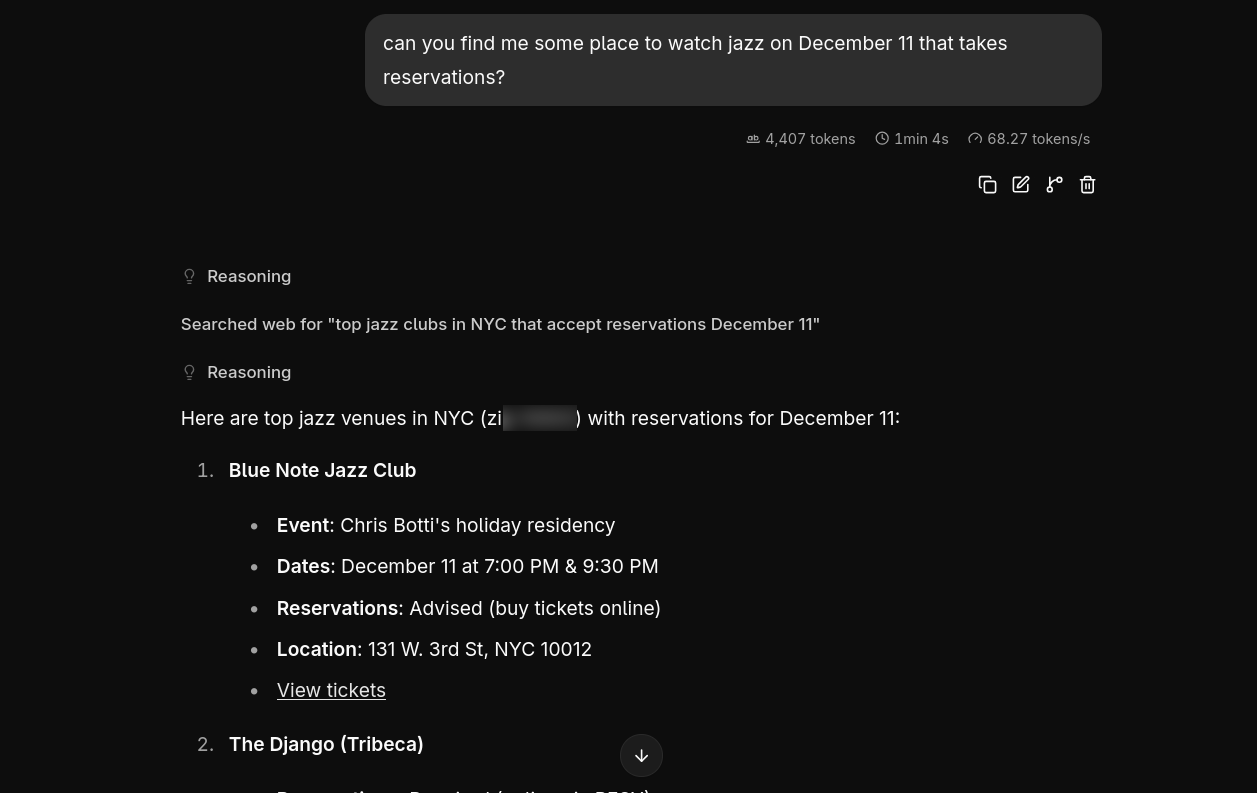
My final test was using it to find jazz venues for December 11th where I could make a reservation and it nailed it in 3m 29s!
So, is it worth it?
For questions I'd rather not send anywhere, yes. It's private by default and costs nothing to run beyond electricity. With thinking on, it searched every time it needed to in my tests, and it cites what it finds.
For anything quick, Haiku is still the answer. A cloud model replies in seconds where this takes minutes, and it handles long chains of tool calls far more reliably. My laptop can stand in for Haiku when privacy matters more than time. It can't replace it.
What comes next
Qwen3 is already a generation behind, and LM Studio's catalog lists Qwen 3.5. I want to try the newer models on the same setup, and compare it with the small local model running in Hermes's experimental channel. If the next generation is twice as fast on the same hardware, the cloud gets a lot harder to justify for personal stuff. I also haven't tested any coding or configuration tasks with it. The entire set up was created by Opus and I doubt my local Qwen3 could have done any of it or published this article.
If you're running local models on hardware like this, I'd like to hear what's working for you. I'm @vincew@masto.nyc.